Choose the connector before opening a pinout
The lookup stays blank until you identify a physical family. It only offers views supported by the reviewed fixture.
A returned map is a reference, not proof of the installed wiring. Verify molded labels, product instructions, and circuit behavior before moving or energizing conductors.
Use the lookup above only after identifying the physical connector. It returns a function inventory, view warning, and canonical reference for 4-way flat, 5-way flat, 6-way round, or 7-way RV blade systems. It does not infer an unknown connector from wire color, trailer type, or the phrase “7-pin.”
The current tool intentionally supports rear wire-entry views only for 4-way flat, 5-way flat, and 6-way round. It supports four views for the reviewed 7-way RV blade transform. An unavailable choice is a safety boundary, not a missing convenience.
Select the physical connector family
Start with the contact interface while disconnected. Count positions, then identify contact shape, housing shape, and keying. Pin count is only one attribute.
| Family in this lookup | Physical clue | Function capacity in the fixture | Important boundary |
|---|---|---|---|
| 4-way flat | Four positions in a keyed flat body | Ground plus three lighting feeds | No independent brake, power, or reverse path |
| 5-way flat | Five positions in a keyed flat body | Four base paths plus one verified function | Fifth is commonly reverse/lockout, not universally proven |
| 6-way round | Six round positions in a circular keyed body | Four base paths plus brake and auxiliary capacity | Brake and auxiliary assignments can vary |
| 7-way RV blade | Six flat blades around a center contact | Four base paths plus common brake, power, and reverse capacity | Not a seven-round-pin connector |
If the connector is square, seven-round-pin, 4-way round, imported, commercial, agricultural, or proprietary, do not select the closest-looking option. Use the connector types guide and exact equipment documentation. The lookup refusing a family is preferable to returning a plausible but wrong map.
Why trailer type is not identification
A boat trailer often uses a 5-way flat, but it can use another connector. A travel trailer often uses an RV blade, but that does not prove every position is active. A horse or equipment trailer may use a 6-way round or another interface. Previous owners can replace connectors without preserving a common convention.
Describe what is installed rather than what the trailer “should have.” Record the body, contact style, key, connector half, and visible part number. Use a clear contact-face photo for parts selection, but do not expose or probe energized contacts merely to take it.
Select vehicle or trailer side
The vehicle generally has a socket or receptacle; the trailer generally has a cabled plug. Choose the equipment side directly instead of relying on “male” or “female,” which sellers use inconsistently for mixed blade and socket contacts.
The tool reads its family list, supported views, warnings, circuit inventory, and canonical URL from the verified pinout-lookup-data fixture. It does not maintain a second hand-written JavaScript pinout table. The same fixture passes deterministic checks for unique family IDs, source records, supported views, functions, warnings, and references.
Why some view choices are missing
For flat and six-way families, this validation release includes only the rear views that were directly controlled in the project fixture. The tool will not manufacture a mating-face selection by flipping a table without a reviewed diagram. Open the canonical reference or exact product instructions when the needed view is unavailable.
For the 7-way RV blade, the project stores one keyed base contact set and explicit left/right transforms for vehicle rear, vehicle mating face, trailer rear, and trailer mating face. That makes the relationship reproducible.
What the result means
A result confirms only this statement:
For the selected controlled family and supported view, these are the circuit categories and limitations represented by the reviewed project fixture.
It does not confirm that the tow vehicle supplies each circuit, that the trailer uses every circuit, that conductor colors match, or that a powered auxiliary position suits a particular battery or load.
Fixture provenance and maintenance
The lookup data lives in validation-connector-diagrams.json. Each family has a stable ID, human label, canonical reference, supported-view list, function inventory, warning, and source IDs. The diagram QA gate rejects duplicate family IDs or incomplete functions, views, warnings, and references. Content and link gates require the referenced pages and media to exist before publication.
This structure prevents the widget from silently returning a family absent from the reviewed fixture. It does not eliminate source maintenance. When a source changes, a family is added, or a diagram is corrected, the fixture, generated media, article explanation, and review artifact must change together.
The current release deliberately omits automatic photo recognition. Image classification could mistake corrosion, camera angle, covers, or visually similar housings and would add cost without deterministic evidence. A manual physical-family selection is easier to audit and correct.
Select mating or wire-entry view
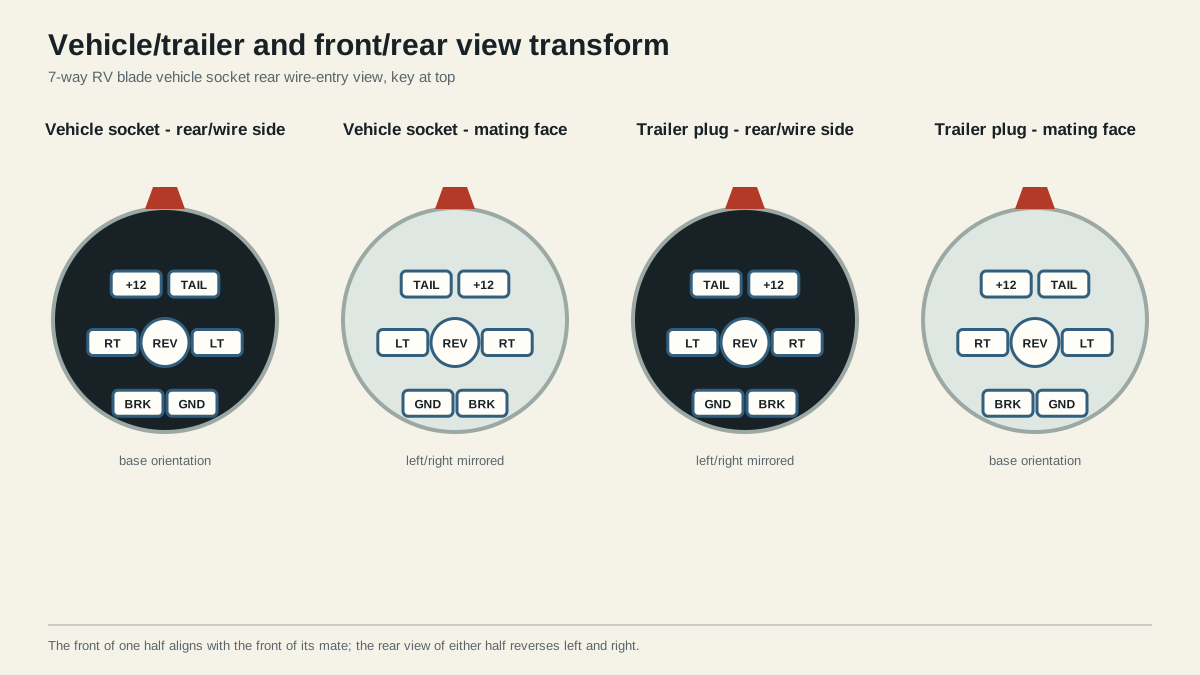
The mating face is the side that touches the other connector. The rear or wire-entry face is where conductors terminate. With the key held in one direction, changing from front to rear mirrors left and right. The rear view of the opposing connector half is also mirrored.
Use a complete label such as “7-way RV blade, trailer plug, rear wire-entry view, key at top.” If a source merely says “plug view,” treat it as unresolved. The vehicle-side versus trailer-side guide provides the full translation method.
Tool result versus physical position
For 4-way and 5-way flat selections, the result first tells you which circuit categories belong to the family and then links to the paired rear-view diagram. For 6-way round, it highlights the brake/auxiliary variation and links to the family decision page. For RV blade, it links to the orientation-specific function reference.
This two-step design avoids squeezing high-risk caveats into a small widget. The lookup narrows the task; the canonical page owns the diagram, source explanation, testing sequence, and stop conditions.
Selection walkthroughs
Known 5-way boat-trailer plug: identify the flat five-position body and choose trailer rear when the conductors are visible. The result lists four base functions plus a reverse or verified fifth circuit, warns that the fifth use must be tested, and routes to the 5-way reference. It does not claim a solenoid, fuse, or conductor size.
Unknown round connector with six contacts: choose 6-way round only after confirming the key and body. The result warns about brake/auxiliary variation and exposes rear views only. If a mating-face position is needed, stop at the tool boundary and use the exact connector instructions instead of selecting RV blade because it offers more views.
Seven-contact circular housing: inspect the contacts. Choose RV blade only when the outer contacts are flat blades. If they are round, the family is outside the current lookup. This refusal prevents “round” from describing the housing while the tool assumes blade contacts.
Four-way lighting trailer: select 4-way flat and the supported rear half. The result confirms capacity for the ground and three lighting feeds. If the trailer has electric brakes, reverse lockout, or auxiliary power, the mismatch is a connector-capacity decision, not a reason to invent another position.
Do not use color as the selector
Wire color can vary between traditional RV conventions, SAE examples, replacement cords, and previous repairs. A color may also mean different functions in different connector families. Select the physical family first, then determine function through labels, documentation, tracing, and measurement.
Verify the returned circuit map on the installed connector
Use this sequence after the tool routes you to a reference:
- Confirm the reference title names the same physical family.
- Confirm vehicle or trailer half and mating or rear face.
- Align the key or other asymmetric feature exactly as shown.
- Read molded terminal labels and exact product instructions.
- With the trailer disconnected and vehicle secured, command one vehicle output at a time.
- Follow the brake-controller procedure for brake output.
- Verify auxiliary source, protection, state, and intended load from vehicle documentation.
- Trace trailer conductors to their loads and returns.
- Connect the secured trailer only after assignments agree, then repeat every required function.
Record evidence, not just the answer
| Field | Example of useful evidence |
|---|---|
| Family | “7-way RV blade,” supported by contact photo and part number |
| Side/view | “Vehicle rear, key up,” supported by open housing labels |
| Function | Commanded left turn measured at the expected terminal |
| Source | Exact vehicle, connector, adapter, controller, or trailer manual |
| Load check | Correct function remains stable with the load operating |
| Return check | Ground path passes the applicable loaded test |
| Unresolved | Inactive auxiliary position; purpose and protection not yet documented |
Stop when the returned family does not match, the needed view is unsupported, molded labels conflict, an output appears on another position, ground is unstable, brakes behave unexpectedly, or auxiliary power is undocumented. Do not select another tool option until something seems to work.
The lookup is most useful as a routing layer. Use the connector selector when the required functions are known but the connector family is not. Use the full orientation guide when the family is known but the face is uncertain.
What the tool intentionally does not calculate
It does not select conductor size, fuse or breaker rating, brake-controller gain, battery charging method, or permissible load. Those answers depend on circuit length, conductor construction, environment, load, product limits, vehicle design, and variables absent from a connector selection. It also does not claim legal compliance for a trailer or jurisdiction.
It does not remember selections, upload photos, or send connector data to a server. The interaction runs in the built page from a small local fixture. That keeps the validation tool inexpensive and usable without a database, account, API, or paid lookup service.
The article remains useful if client-side scripting is unavailable. The family table, orientation visual, verification sequence, and canonical links are ordinary page content. The interactive selector is an acceleration layer, not the only place where limitations are disclosed. Keyboard users can move through the two labeled selects and the result is announced through a live status region. A blank first state prevents an automatic recommendation from being mistaken for observed connector identity.
Future additions should follow the same rule: a new family needs authoritative scope, a controlled fixture, supported views, a canonical owner, a visible warning, deterministic tests, and review. Search demand alone is not enough to add an option.
If those inputs are incomplete, the safer product behavior is to omit the family and route the reader to identification and measurement guidance.
Sources
Last verified: August 25, 2026.